Difference Between Mechanical and Membrane Explained
Mechanical and membrane are two terms often used interchangeably with keyboards, switches, and input devices, but they describe fundamentally different technologies. This article explains the differences clearly and objectively so prospective buyers, professionals, and hobbyists can make informed decisions. It covers how each technology works, real-world use cases, durability and maintenance considerations, typical buyer priorities, and an actionable buying guide.
Introduction
Keyboards are among the most personal components of a computing setup, and the choice between mechanical and membrane styles affects typing feel, sound, longevity, and overall user satisfaction. Gamers, programmers, writers, office workers, and casual users all evaluate keyboards differently: some prioritize speed and tactile feedback, others look for quiet operation and low cost. Understanding the technical differences and the practical trade-offs helps match the right product to each user’s needs.
Featured products
The two product categories examined here are denoted simply as Mechanical and Membrane. Each label represents a wide range of specific models and implementations, from premium custom mechanical keyboards with hot-swappable switches to budget membrane office boards. The following analysis treats these as representative types rather than specific brand models.
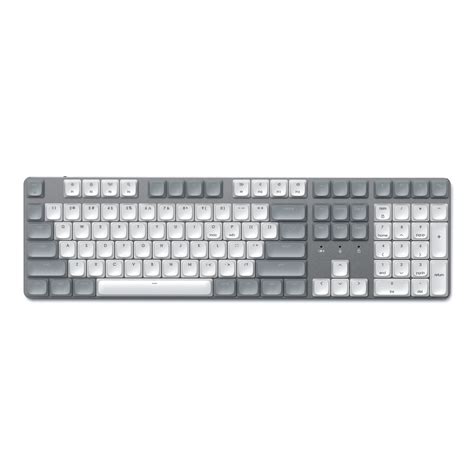
How They Work: Technical Overview
Mechanical
A mechanical keyboard uses individual physical switches beneath each keycap. Each switch contains components such as a spring, stem, and electrical contacts. When the key is pressed, the moving parts interact to complete the circuit and register a keystroke. Mechanical switches are available in many varieties—linear, tactile, and clicky—each offering a distinct feel and sound. Popular mechanical switch characteristics include defined actuation points, consistent travel distances, and relatively high durability (often rated in tens of millions of keystrokes).
Membrane
Membrane keyboards rely on a set of layered plastic membranes with conductive traces. Pressing a key presses the top membrane into contact with a bottom membrane, closing the circuit at that key location. Many consumer-grade membrane keyboards use a rubber dome above the membrane to provide resistance and return force. Membrane designs are simple, compact, and inexpensive to manufacture. They typically provide a softer, less defined keypress and are quieter than many mechanical options.
Detailed Product Review/Analysis
Mechanical: What stands out
Mechanical keyboards are commonly praised for their tactile feedback and modularity. Enthusiasts value the ability to swap switches and keycaps, fine-tune actuation through different switch types, and even change stabilizers for larger keys. High-end mechanical keyboards often include features like N-key rollover (NKRO) for simultaneous key presses, programmable macros, durable metal plates, and replacement parts. Durability is a major selling point: high-quality mechanical switches often last 50 to 100 million keystrokes per key.
From a performance perspective, mechanical switches can provide faster, more reliable actuation for gaming or typing, particularly when paired with low-latency controllers and concise actuation points. The sound profile varies widely based on switch type and build materials: some users enjoy the audible click of certain mechanical switches, while others seek quieter linear switches with dampening measures.
Membrane: What stands out
Membrane keyboards excel in affordability, low-profile design, and quiet operation. For office environments or shared spaces where noise is a concern, modern membrane keyboards can be a sensible choice. Membrane boards are often lightweight and spill-resistant depending on the model, and they frequently come in slim laptop-style profiles suited to portability or tight desk setups.
However, membrane keyboards generally provide less precise tactile feedback and can feel mushier when compared directly to mechanical switches. Their longevity tends to be lower, with rubber domes compressing and losing their springiness over time. For many casual and office users, though, the cost-to-functionality ratio remains attractive.
Discover deals on Electronics — updated daily.
View Offers →Pros & Cons
Mechanical: Pros
- Durability: Long switch lifespans (often 50M+ keystrokes).
- Tactile options: Variety of switch types for tailored feel.
- Customizability: Keycaps, switches, and stabilizers can be changed.
- Performance: Precise actuation, often better for gaming and heavy typing.
- Repairability: Individual switches or parts can be replaced.
- Feature-rich: NKRO, programmable keys, detachable cables, RGB/lighting options.
Mechanical: Cons
- Cost: Typically more expensive initially than membrane models.
- Noise: Clicky switches can be loud in shared spaces.
- Weight and size: Many mechanical boards are heavier and thicker.
- Maintenance: More parts and modding can require upkeep.
Membrane: Pros
- Affordability: Lower purchase price is accessible for most buyers.
- Quiet operation: Generally quieter than many mechanical switch types.
- Low profile and portability: Slim designs are common for travel or small spaces.
- Water resistance: Some models include spill-resistant designs.
- Simple to use: No need to understand switch types or modding.
Membrane: Cons
- Longevity: Rubber domes compress and degrade faster than mechanical switches.
- Tactile feedback: Less precise and often described as “mushy.”
- Limited customization: Few options for swapping switches or keycaps.
- Performance limitations: May lack NKRO and quicker actuation for competitive gaming.
Comparison Table
| Characteristic | Mechanical | Membrane |
|---|---|---|
| Construction | Individual physical switches per key | Layered plastic membranes; often rubber domes |
| Feel | Wide range: tactile, linear, clicky | Softer, less defined, “mushy” |
| Noise | Variable—can be loud (clicky) or quiet (linear) | Generally quiet |
| Durability | High; often 50M–100M key presses | Lower; rubber domes wear down faster |
| Customization | High—switches, keycaps, layouts, mods | Limited |
| Price Range | Mid to high | Low to mid |
| Best For | Gamers, typists, enthusiasts, professionals | Office workers, budget users, portable setups |
| Maintenance | Easy to repair/replace parts | Often replaced entirely when worn |
| Key Rollover | Usually supports NKRO | May be limited (6-key rollover common) |
Real-World Use Cases
Gamers
Competitive gamers often favor mechanical keyboards with low actuation force and quick, consistent response. Linear switches or short-travel tactile switches are common among esports players. NKRO and stable anti-ghosting implementations are important for complex input sequences. However, teams or streamers in shared spaces sometimes prefer quieter linear switches or case dampening to reduce microphone pickup.
Writers and Programmers
Writers and developers usually prioritize comfort and sustained typing feel. Many choose tactile mechanical switches (e.g., brown-style) for clear feedback without the noise of clicky switches. Typing comfort, wrist support, and a reliable stabilizer for larger keys (spacebar, Enter) matter more than raw speed. Some prefer compact mechanical layouts for desk space optimization.
Office Environments
Offices frequently select membrane keyboards for quiet operation and lower cost. Slim membrane designs integrate neatly into shared desks and reduce audible distractions. In environments where durability against spills or frequent replacements is a budgetary concern, membrane keyboards remain a practical choice.
Mobile and Casual Use
Laptop owners and casual users who favor portability often use membrane or scissor-switch keyboards due to their low profile. Bluetooth membrane keyboards that pair with tablets or phones are popular for on-the-go productivity because they balance battery life and slim form factors.
What Buyers Typically Care About
- Typing feel: Many buyers test or research switch types to find the right tactile feedback and actuation force.
- Noise level: Office users and streamers often request quieter solutions.
- Durability: Longevity matters for heavy typists; mechanical is frequently preferred.
- Price and value: Budget constraints push buyers toward membrane; hobbyists often invest in mechanical customizations.
- Customization: Enthusiasts look for hot-swappable options, programmable keys, and aftermarket keycaps.
- Form factor: Full-size, tenkeyless (TKL), compact 60%/65% layouts; smaller boards save desk space.
- Connectivity: Wired vs. wireless, Bluetooth reliability, battery life.
Buying Guide
Choosing between mechanical and membrane depends on usage patterns, budget, and personal preferences. Below are recommended considerations and steps to decide.
1. Define Primary Use
Decide if the keyboard will be used primarily for gaming, heavy typing, casual browsing, or office tasks. For high-performance gaming and intensive typing, mechanical often provides advantages. For shared, quiet offices or budget builds, membrane can be more appropriate.
2. Consider Noise Constraints
If noise matters, choose quiet mechanical switch variants (linear switches with dampening) or a high-quality membrane keyboard. Some mechanical keyboards include sound-dampening foam and quieter stabilizers to reduce clackiness.
3. Budget vs. Longevity
Membrane keyboards are less expensive, but often need replacement sooner. Mechanical keyboards have higher upfront costs with better long-term value for heavy users. Calculate the total cost of ownership based on expected lifespan and replacement frequency.
Looking for the best Electronics deals on Amazon?
Shop Amazon →4. Try Before Buying
Whenever possible, test different key types in person. Retailers, friends, or local meetups often allow hands-on comparison. Key feel is highly subjective; trying various switches prevents buyer’s remorse.
5. Look for Key Features
- NKRO/Anti-ghosting: Important for fast typists and gamers.
- Hot-swap: For those who want to change switches without soldering.
- Build quality: Metal plates and quality stabilizers improve feel and longevity.
- Connectivity: Choose wired for lowest latency or wireless/Bluetooth for mobility; check battery life.
- Warranty and support: Brands with reliable support reduce risk.
6. Consider Ergonomics
Factor in wrist rests, keycap profile, and typing angle. Split or ergonomic mechanical keyboards suit users with repetitive strain concerns; there are also membrane variants with ergonomic designs, but customization is often more limited.
7. Future Proofing
If customization is desirable—changing keycaps, switches, or adding macros—opt for a mechanical keyboard with hot-swap sockets and a vibrant community for aftermarket parts. For users who prefer plug-and-play simplicity, a membrane keyboard minimizes complexity.
Maintenance and Longevity Tips
Mechanical keyboards benefit from periodic cleaning, keycap removal, and occasional switch lubrication or replacement. Membrane keyboards should be kept clean and dry; spilled liquids are often the end for inexpensive membrane boards, though some models include spill-resistant designs. For both types, keeping the workspace free of dust and crumbs extends life.
Environmental and Practical Considerations
From a sustainability perspective, mechanical keyboards can be more repairable, which reduces waste over time compared with disposable membrane keyboards. Buyers concerned with environmental impact may prefer investable mechanical boards with replaceable parts and modularity.
Conclusion
The difference between mechanical and membrane keyboards comes down to construction, feel, durability, and customizability. Mechanical keyboards offer a wide range of tactile experiences, superior longevity, and repairability—making them well suited for gamers, typists, and enthusiasts. Membrane keyboards provide quiet operation, affordability, and compact profiles that appeal to office users, casual typists, and mobile setups.
Ultimately, the right choice depends on the user’s priorities: if performance, customization, and long-term value matter most, a mechanical product is typically the better investment. If cost, quietness, and a low-profile design are the chief concerns, membrane remains a practical and cost-effective option. By weighing real-world use cases, noise tolerance, budget, and desire for customization, buyers can select the product type that best fits their day-to-day needs.