The Truth About the Optix G27C4: Pros, Cons, and Verdict
In the rapidly evolving landscape of gaming peripherals, the monitor serves as the primary window into virtual worlds. For many enthusiasts, the quest for the perfect balance between high-end performance and budget-friendly accessibility leads directly to the MSI Optix G27C4. As a curved gaming monitor that focuses on speed and immersion, it has carved out a significant niche for itself in the mid-range market. However, with so many options available featuring varying panel technologies and resolution scales, determining whether this specific model remains a viable choice requires a deep dive into its technical capabilities and real-world performance.
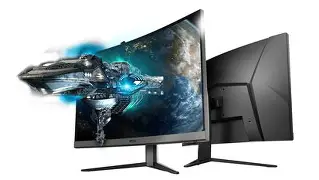
The Optix G27C4 is designed for gamers who prioritize fluidity and a wrap-around visual experience. By utilizing a 1500R curvature and a high refresh rate, MSI aims to provide a more natural field of view that minimizes eye strain and maximizes engagement. But in a market where 1440p (QHD) is becoming the new standard for 27-inch displays, the decision to stick with 1080p (FHD) on a screen of this size is a point of contention for many. This article explores the nuances of the G27C4, analyzing its color accuracy, motion handling, and build quality to help potential buyers decide if it fits their specific gaming setup.
Detailed Product Analysis
At the heart of the Optix G27C4 is a Vertical Alignment (VA) panel. VA technology is often chosen for gaming monitors because it offers a middle ground between the lightning-fast response times of Twisted Nematic (TN) panels and the superior color reproduction of In-Plane Switching (IPS) panels. One of the most significant advantages of a VA panel is its contrast ratio. While most IPS monitors struggle to reach a 1000:1 contrast ratio, the G27C4 boasts a 3000:1 ratio. In practice, this means blacks are deeper and more meaningful, making it an excellent choice for gamers who enjoy atmospheric titles like Resident Evil, Dead Space, or even slow-paced cinematic experiences like Red Dead Redemption 2.
The curvature of the screen is measured at 1500R. This numerical value indicates that if you were to place enough of these monitors side-by-side to form a complete circle, the radius of that circle would be 1500 millimeters. A 1500R curve is considered more aggressive than the older 1800R standard, meaning the edges of the monitor sit closer to the user’s peripheral vision. This is particularly beneficial for 27-inch screens, as it helps maintain a uniform distance between the user’s eyes and any point on the display, reducing the need for constant refocusing as you scan the screen during high-stakes gameplay.
Motion handling is where the G27C4 truly shines for competitive players. With a refresh rate of 165Hz, it provides a significantly smoother experience than standard 60Hz or even 120Hz displays. When paired with a capable graphics card, the 165Hz refresh rate ensures that fast-moving objects appear clear and that camera pans in first-person shooters like Valorant or Apex Legends are fluid. The monitor also supports AMD FreeSync technology, which synchronizes the display’s refresh rate with the GPU’s frame rate. This is essential for preventing screen tearing and minimizing stuttering when frame rates fluctuate during intense scenes.
However, the resolution of 1920 x 1080 on a 27-inch panel is a compromise. The pixel density is roughly 82 pixels per inch (PPI), which is noticeably lower than the pixel density of a 24-inch 1080p monitor or a 27-inch 1440p monitor. For gaming, this isn't always a dealbreaker, as the extra screen real estate provides a more immersive view. But for productivity tasks involving text—such as spreadsheets, coding, or long-form reading—the "screen door effect" or slight pixelation may be apparent to users who sit close to their display. It is a trade-off that buyers must weigh: do you want the competitive edge of higher frame rates at a lower cost, or are you willing to pay more for the sharpness of a higher resolution?
Color Performance and Gamut
MSI markets this monitor as a "Wide Color Gamut" display, and the numbers back that up. It covers approximately 90% of the DCI-P3 color space and 115% of the sRGB space. This results in colors that look vibrant and "poppy" out of the box. While it may not be accurate enough for professional-grade color grading or photography work without significant calibration, it is more than sufficient for gaming and media consumption. The red and green hues, in particular, appear saturated and rich, which breathes life into lush environments and fantasy landscapes.
The viewing angles, as expected from a VA panel, are decent but not perfect. While MSI claims a 178-degree viewing angle, there is a noticeable "gamma shift" when viewing the screen from extreme horizontal or vertical positions. Fortunately, the curved design helps mitigate this issue by keeping the edges of the screen angled toward the viewer, effectively locking the user into the "sweet spot" at the center of the arc. As long as you are the primary user sitting directly in front of the monitor, color shifting is a non-issue.
Discover deals on Electronics — updated daily.
View Offers →Comparison of Technical Specifications
To better understand where the Optix G27C4 sits in the current market, it is helpful to compare its key features against common competitor configurations in the same price bracket.
| Feature | Optix G27C4 | Standard IPS 27" | Standard TN 24" |
|---|---|---|---|
| Panel Type | VA (Curved) | IPS (Flat) | TN (Flat) |
| Refresh Rate | 165Hz | 144Hz - 165Hz | 144Hz - 240Hz |
| Contrast Ratio | 3000:1 | 1000:1 | 1000:1 |
| Response Time | 1ms (MPRT) | 1ms - 4ms (GtG) | 0.5ms - 1ms (GtG) |
| Curvature | 1500R | N/A | N/A |
| Color Accuracy | High (Wide Gamut) | Excellent | Low/Fair |
Pros and Cons
Like any piece of electronics, the Optix G27C4 has clear strengths and weaknesses that emerge during heavy usage. Understanding these will help determine if the monitor aligns with your specific gaming habits and room environment.
Pros
Cons
The Buying Guide: Should You Choose 1080p in 2026?
The biggest question facing potential buyers of the G27C4 is whether 1080p is still "enough" for a 27-inch monitor. To answer this, one must look at their hardware and their priorities. If you are a competitive gamer who plays titles like Counter-Strike or League of Legends, your goal is to maximize frames per second (FPS). 1080p allows your graphics card to push much higher FPS than 1440p, making it easier to hit that 165Hz ceiling. In these scenarios, the trade-off in resolution is a strategic advantage.
Furthermore, if you are working with a mid-range PC build—perhaps something featuring a modern xx60 series card—running games at 1440p could lead to significantly lower frame rates or forced settings reductions. The G27C4 allows you to keep your settings at "Ultra" while still enjoying high refresh rates. It is an "accessible" form of high-performance gaming that doesn't require a $2,000 rig to fully utilize.
However, if your primary use case is "office work first, gaming second," you might find the resolution lacking. At 27 inches, text clarity is not as sharp as it is on a 24-inch 1080p panel or a 27-inch 1440p panel. Those who spend eight hours a day reading small fonts for work might experience more eye fatigue. For those users, we recommend either stepping up to a 1440p display or sticking to a 24-inch 1080p display for a tighter pixel density.
Another factor to consider is the physical setup. The G27C4 features a VESA mount pattern (100 x 100mm). Given that the stock stand is somewhat limited in ergonomics, budget-conscious buyers should factor in the cost of an aftermarket monitor arm if they require height or swivel adjustments. The frameless design makes it a beautiful centerpiece, but the lack of height adjustment out of the box is a notable omission for ergonomic health.
The Real-World Gaming Experience
When putting the Optix G27C4 through its paces in various genres, the strengths of the VA panel become evident quickly. In racing games like Forza Horizon, the combination of the 1500R curve and the 165Hz refresh rate makes for an exhilarating experience. The curve pulls the edges of the track into your peripheral vision, simulating the view from a real cockpit more effectively than a flat panel would. The wide color gamut makes the landscapes of such games look stunning, with vibrant sunsets and deep shadows.
In contrast, in competitive shooters, some users might notice the inherent weakness of VA panels: response time transitions in dark colors. While the monitor is marketed with a 1ms MPRT (Moving Picture Response Time), the "Gray-to-Gray" (GtG) response time in darker transitions is slower. This results in "smearing." For example, if you are moving a black character model against a dark gray wall, you might see a slight "shimmer" or "shadow" trailing the movement. Most casual and semi-competitive players will not notice this, but professional-level esports players might find it distracting and prefer a TN or fast-IPS panel instead.
Find top-rated Electronics products at great prices.
View Offers →For movie watching, the G27C4 is surprisingly capable for its price range. The high contrast ratio allows for cinematic blacks that IPS monitors simply cannot replicate. If you find yourself using your gaming monitor as a TV replacement in a bedroom or a small dorm room, the G27C4 provides a much better viewing experience for film than similar budget IPS models, which often suffer from "IPS glow" where the corners of the screen appear to leak light in dark scenes.
Installation and Connectivity
Setting up the MSI Optix G27C4 is relatively straightforward, although it does require a screwdriver to attach the stand—something more modern "tool-less" designs have moved away from. The port selection includes one DisplayPort 1.2a and two HDMI 1.4b ports. It is important for users to note that to achieve the full 165Hz refresh rate, they should use the DisplayPort connection. HDMI 1.4 is technically limited and may only support up to 144Hz, depending on the settings and the cable quality used.
The OSD (On-Screen Display) menu is controlled via a small red joystick on the back of the monitor. This is a far superior interface compared to the clunky buttons found on many competitors. The menu is intuitive and allows gamers to toggle features like "Night Vision" (which brightens dark areas of the screen without overexposing bright areas), crosshair overlays, and various image presets for FPS, Racing, and RPG genres.
Final Verdict
The MSI Optix G27C4 is a specialized tool that performs exceptionally well when used for its intended purpose. It is not a "do-it-all" monitor for every single user, but it is a powerhouse for a very specific segment of the gaming population. If you value immersion, deep contrast, and high frame rates above raw resolution and pixel-perfect text clarity, this monitor offers incredible value. Its 1500R curve makes gaming more engaging, and its 165Hz refresh rate provides the fluidity needed for modern gaming.
The "Truth" about the G27C4 is that it is a master of compromises. It sacrifices resolution to keep the price down and the frame rates up. It uses a VA panel to give you better blacks at the cost of some dark-level smearing. It provides a beautiful frameless design but skimps on stand ergonomics. For the gamer on a budget who wants a large, fast, and curved screen, these compromises are often more than acceptable—they are the key to getting high-end features at a mid-range price point.
Ultimately, the Optix G27C4 remains a strong contender in the electronics market. It is best suited for gamers with mid-tier PCs who want a dedicated gaming screen that doubles as an excellent media consumption device. While the industry may be moving toward 1440p and 4K, the 1080p powerhouse that is the G27C4 proves that there is still plenty of life left in FHD when it is paired with the right panel technology and a high enough refresh rate to keep the action smooth.